SMS Messaging from Bootup Studios
Last updated September 30, 2026
Bootup Studios Inc. operates one text messaging program, Bootup Studios SMS. It is optional, it is opt-in, and nothing else in the product depends on it. Message and data rates may apply. Message frequency varies with your own use. Reply STOP to any message to opt out. Reply HELP for help.
There are two ways to opt in, and only two: link and verify your own mobile number inside your Bootup Studios account, or text our number yourself and complete the consent flow described below. A number that has done neither hears from us only when it texts us first, and then only as our reply to that message.
We send account, security, project and billing messages, replies to messages you send us, results from automations you scheduled yourself, and notices written by an administrator of an organization you belong to. Bootup Studios sends no promotional text messages of its own. We do not sell or rent phone numbers, and we do not share a phone number with any third party for their own marketing.
This page is written in English. Any translation is provided for convenience only; if a translated version conflicts with the English version, the English version controls.
The program at a glance
- Program name: Bootup Studios SMS
- Sponsor: Bootup Studios Inc.
- What it is: an AI business assistant you can reach by text, plus notifications about your own projects, account, billing and any organization you belong to
- Who receives messages: only people who completed one of the two opt-in flows below
- Message frequency: varies with your use. Most people receive between 0 and 30 messages per week.
- Cost: Bootup Studios does not charge you for messages. Message and data rates may apply.
- Opt out: reply STOP to any message
- Help: reply HELP to any message, or email developer@bootupstudios.ai
- Terms of Use: bootupstudios.ai/terms — Privacy Policy: bootupstudios.ai/privacy
- Carriers are not liable for delayed or undelivered messages.
Who can receive messages
Only people who have opted in through one of the two paths below.
- Created a Bootup Studios account at bootupstudios.ai, signed in, and linked and verified their own mobile number on the Settings → SMS Access page; or
- Texted our number first themselves and completed the in-message signup flow: gave their name, gave their email, replied YES to our consent prompt, and texted back the code we emailed to that address. The conversation proves they control the number, and the emailed code proves they control the address.
A number that has not completed one of these flows receives nothing from Bootup Studios except our direct reply to a message that number sent us first. We do not buy, rent, import or append phone numbers, and we do not accept a number on someone else's behalf.
Sign up by SMS
If you text our number from a phone that does not yet have a Bootup Studios account linked, we reply with a welcome message carrying the carrier-required disclosures and ask for your full name. The flow is five short turns, and the last of them proves you can read the email address you gave us.
- You text anything to our number. We reply:
Welcome to Bootup Studios! I'll set you up in 4 quick steps. Msg & data rates may apply. Reply STOP to unsubscribe, HELP for help. First, what's your full name?
- You reply with your name. We then ask for your email.
- You reply with your email. We then ask for explicit consent:
Got it. By replying YES you agree to our Terms (bootupstudios.ai/terms) and Privacy Policy (bootupstudios.ai/privacy) and to receive SMS at this number. Msg frequency varies with your use. Reply STOP to opt out anytime. Reply YES and I'll email you a code.
- You reply YES. Your consent is recorded, and we email a 6-digit code to the address you gave us. No account exists yet. Any other reply, including NO or STOP, ends the flow here.
Almost done. I emailed a 6-digit code to you@example.com. Text it back to finish. It expires in 10 minutes. Reply RESEND for a new one, or NO to stop.
- You text that code back. Only then do we create your account, and the sign-in link is emailed to the same address. The link is never sent by text. Someone who cannot read that inbox cannot finish this flow, which is what stops a number being signed up under a stranger's email.
At any point in this flow you can reply STOP. We create no account, we discard the name and email you gave us, and we send you nothing further.
Right after you text the code back, we send one more message to a +1 number: our contact card. It is sent once and is described under Types of messages we send, below.
This path exists for people who would rather not fill in a web form. The same account is available at bootupstudios.ai with no phone number at all.
How to opt in from the app
- Create an account and sign in at bootupstudios.ai.
- Go to Settings → SMS Access and enter your own mobile phone number into the "Link Phone" field. The consent disclosure sits directly below the field, and linking is a separate action you take on purpose.
- Bootup Studios sends you a single SMS with a 6-digit verification code:
Bootup Studios code: 123456. Expires in 10 minutes. If you did not request it, ignore this. Msg & data rates may apply. Reply STOP to opt out, HELP for help.
- Enter that code back in Settings, or reply to the text with the code, to confirm you control the number.
- Only after successful verification is your number stored as opted in. We send nothing further to a number that has not been verified.
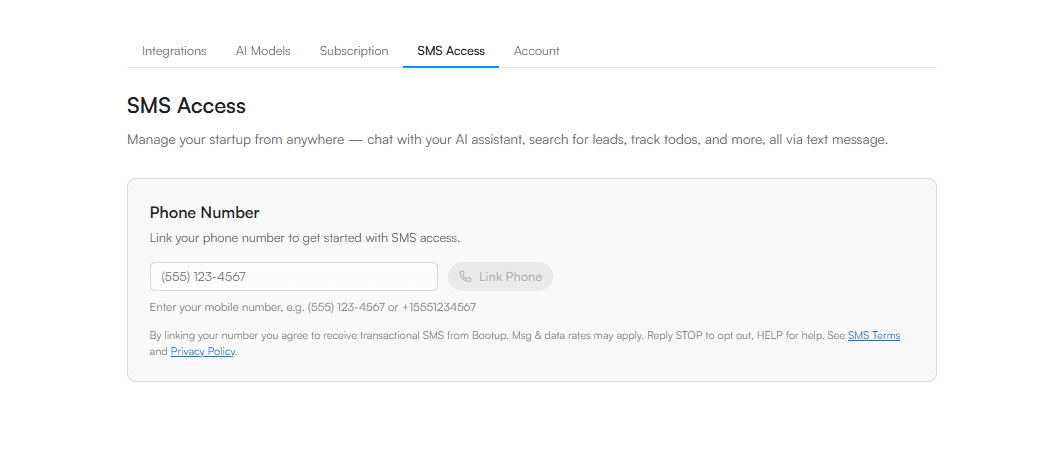
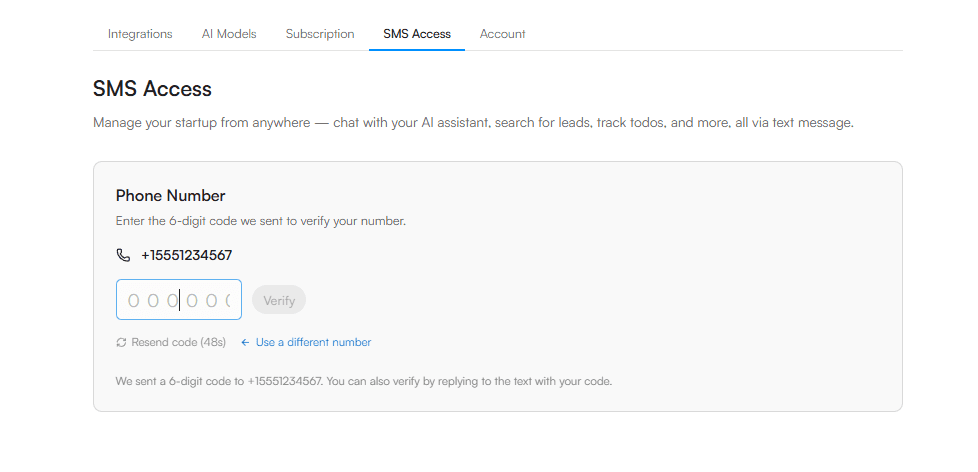
After your number is verified we send one more message to a +1 number, our contact card, once. It is described under Types of messages we send, below.
Types of messages we send
Every message below is a reply to something you sent us, a notice about your own account, the result of an automation you scheduled, or a notice written by an administrator of an organization you belong to. Bootup Studios sends no promotional messages of its own, and replying STOP stops all four kinds at once.
Verification codes
Bootup Studios code: 123456. Expires in 10 minutes. If you did not request it, ignore this. Msg & data rates may apply. Reply STOP to opt out, HELP for help.
Our contact card, once
Save this card to your contacts so our texts show up as Bootup Studios, with our logo. Reply STOP to opt out, HELP for help.
This is an account notice, sent once, right after you verify your number. It arrives as a multimedia (MMS) message with our contact card attached, a .vcf file with our name, number and logo, so you can save us to your contacts. It is the only message on the program that carries an attachment. It is not sent again unless you link a number again, and it goes only to numbers with the +1 country code.
Replies to messages you send us
Week 4: Launch prep - next up: 2. Set up the online store 5. Email 10 stockists your one-pager 9. Draft the wholesale price list +4 more open - reply /todos all for the whole week. Mark done: /done [number] Next week: /todos next View on web: https://www.bootupstudios.ai/project/4kR2mVq8XcT1sPbN/timeline
Lead-search results
Found 3 leads for "fintech founders in NYC": 1. Jane Doe - New York, NY - janedoe.com 2. Ravi Patel - Brooklyn, NY - patelcapital.com 3. Mia Chen - New York, NY - chenfintech.com
Plan-ready notices
Bootup Studios: your Acme Corp business plan is ready to review at https://www.bootupstudios.ai/project/4kR2mVq8XcT1sPbN/timeline. Reply STOP to opt out, HELP for help.
We also send event notices about your own account, each fired once by something that happened in it: the next week of your project plan unlocking; another Bootup Studios user giving you access to a project; and account or organization notices such as an invitation, a seat change or a plan lapse.
Results from an automation you scheduled
"summarize new investor email": Three replies overnight. Two want a call this week, one passed. View: https://www.bootupstudios.ai/project/4kR2mVq8XcT1sPbN/tasks Reply STOP to opt out, HELP for help.
An automation is created by you, inside your own account, and whether its result reaches you by text is a switch you set. If you set one to repeat, it runs on the day and time you chose and texts you the result then. This is the one message on the program that arrives on a clock rather than in answer to something you just did. Pause it by replying /tasks pause, change or delete it on the web, or reply STOP to end every text on this program.
Notices from an organization you belong to
How's it going?: We're checking in on how you're finding Bootup. Tell us what would help. Reply STOP to opt out, HELP for help.
If you are a member of a Bootup Studios organization, an administrator of that organization can send its members a notice from the organization console, and the wording is theirs rather than ours. It reaches only members who opted in to SMS through one of the two paths above, and it is the one message type here that somebody other than you can trigger. Replying STOP stops these along with everything else, and leaving the organization stops them too.
Every message we send that you did not just ask for - verification codes, our contact card, event notices, automation results and organization notices - carries "Reply STOP to opt out, HELP for help." A direct reply to a message you just sent us does not repeat that line, so a conversation is not padded with the same sentence every turn. STOP and HELP are honoured on any message either way.
Message frequency
Three things generate messages. Replies: you receive one reply for each message you send us, and a long answer arrives as more than one message, because a single text is capped and we split at a sentence boundary rather than truncate. Notifications: the event notices above each fire once, on something happening in your own account, and several of them never fire at all for most people. Our contact card is also a notification that fires once, right after you verify your number. Automations: a task you scheduled yourself texts you its result when it runs, as often as you told it to run.
Message frequency therefore varies with your use. Most people receive between 0 and 30 messages per week. Bootup Studios runs no campaign of its own and does not re-engage a number that has gone quiet. The only send that follows a calendar is an automation you created and set to repeat, on the schedule you chose, and you can pause or delete it at any time.
Carrier rates
Message and data rates may apply. Check with your wireless carrier for details. Bootup Studios does not charge you for messages. Carriers are not liable for delayed or undelivered messages.
How to opt out
Reply STOP to any message from us. We stop immediately — there is no waiting period and no confirmation step to complete.
We accept all of these, and treat them identically: STOP, STOPALL, UNSUBSCRIBE, CANCEL, END, QUIT, OPT OUT, OPTOUT, REVOKE, PARAR, DETENER. Case does not matter and punctuation does not matter, so "Stop.", "STOP!", "opt-out" and " stop " all work. We match the whole message, so an ordinary sentence that happens to contain one of these words — "stop by later", "cancel my 3pm" — stays an ordinary message and does not opt you out.
We reply once, and then nothing further:
You have been unsubscribed from Bootup Studios SMS and will receive no further messages. Reply START to resubscribe.
What that does
We add your number to a permanent do-not-message record. That record is the thing that stops the messages: it blocks every outbound message to your number and drops every inbound message from it, whether or not your number is linked to an account. If you were part-way through signing up by text, we also discard the name and email you had given us.
Your account keeps its phone link. Opting out suppresses messages; it does not disconnect you, and it does not delete anything you have made in Bootup Studios.
Coming back
Reply START, UNSTOP, OPT IN or OPTIN and we remove the do-not-message record and resume service on the same number, with no re-linking:
You are resubscribed to Bootup Studios SMS. If this number is linked to an account, just text us to pick up where you left off. Otherwise, text us anytime to create one.
Two other ways to stop
- Disconnect. Open Settings → SMS Access in the Bootup Studios app and click Disconnect. This unlinks the number from your account and ends the messages for that account. It removes the link rather than adding a do-not-message record, so linking a number again later resumes messages. Reply STOP if you want the permanent record.
- Ask us in writing. Email developer@bootupstudios.ai from any address, or tell us to stop in a text in your own words. We honour a request to stop made in any reasonable manner, within ten business days of receiving it, and in practice the same day. You do not have to use one of our keywords.
We retain the number on the do-not-message record for as long as necessary to keep honouring your request, because that record is what prevents us from ever texting it again. It is used for nothing else.
HELP
Reply HELP, or INFO, to any message. We reply:
Bootup Studios SMS: 1:1 messages to your linked Bootup Studios account. Help: developer@bootupstudios.ai. Opt out anytime: reply STOP. Msg & data rates may apply.
You can also email us at developer@bootupstudios.ai. HELP works whether or not your number is linked, and whether or not you have opted out.
Consent is not a condition of anything
You are not required to agree to receive text messages in order to create a Bootup Studios account, to use the product, or to buy anything from us. Linking a phone number is an optional step in Settings that nothing else depends on, and you can leave it undone forever.
Signing up by text is a convenience for people who would rather not fill in a web form. On that path, text messaging is the channel the account is delivered on, so agreeing to receive texts is part of it. The same account, with the same features, is available at bootupstudios.ai with no phone number at all.
You must be 18 or older to have a Bootup Studios account, and to use this program.
Privacy and terms
Phone numbers and message content are handled as described in our Privacy Policy. Your use of Bootup Studios SMS is also governed by our Terms of Use. SMS is delivered via Twilio. We do not sell your phone number, and we do not share it with third parties for marketing purposes.
Questions about this program: developer@bootupstudios.ai.